
Table of Contents
- 1. 1. The October 2026 Firestick Shake-Up: What Is Amazon's Vega OS?
- 2. 2. Why Downloader and TiviMate Cannot Run on Vega OS
- 3. 3. The 20-Second Settings Check: Does Your Firestick Run Fire OS or Vega OS?
- 4. 4. UK Fire TV Stick Lineup Breakdown: Fire TV Stick 4K Vega OS Apps UK Compatibility
- 5. 5. Best Alternative Streaming Hardware for UK IPTV in Late 2026
- 6. 6. Bought a Vega OS Stick by Mistake? Your Options and Workarounds
- 7. 7. Frequently Asked Questions (FAQ)
- 8. 8. Conclusion: The Final UK Cord-Cutter's Verdict
If you are researching fire tv stick 4k vega os apps uk compatibility, the short answer is sobering: Amazon's 3rd-generation Fire TV Stick 4K and Fire TV Stick HD run Vega OS—a proprietary Linux platform that eliminates the Android runtime. This permanently blocks APK sideloading, the Downloader app, and TiviMate. To stream IPTV in the UK, you must specifically buy an Android-powered Fire OS 8 device like the Fire TV Stick 4K Max (2nd Gen) or Google TV.
Do NOT purchase the standard Fire TV Stick 4K (3rd Gen, 2026) or Fire TV Stick HD (2026) if you intend to stream IPTV via Downloader, TiviMate, or IPTV Smarters Pro. These models run Amazon's closed, Linux-based Vega OS. If you want a brand-new Firestick that still supports Android APK sideloading, buy exclusively the Amazon Fire TV Stick 4K Max (2nd Gen, 16GB), which remains powered by Fire OS 8.
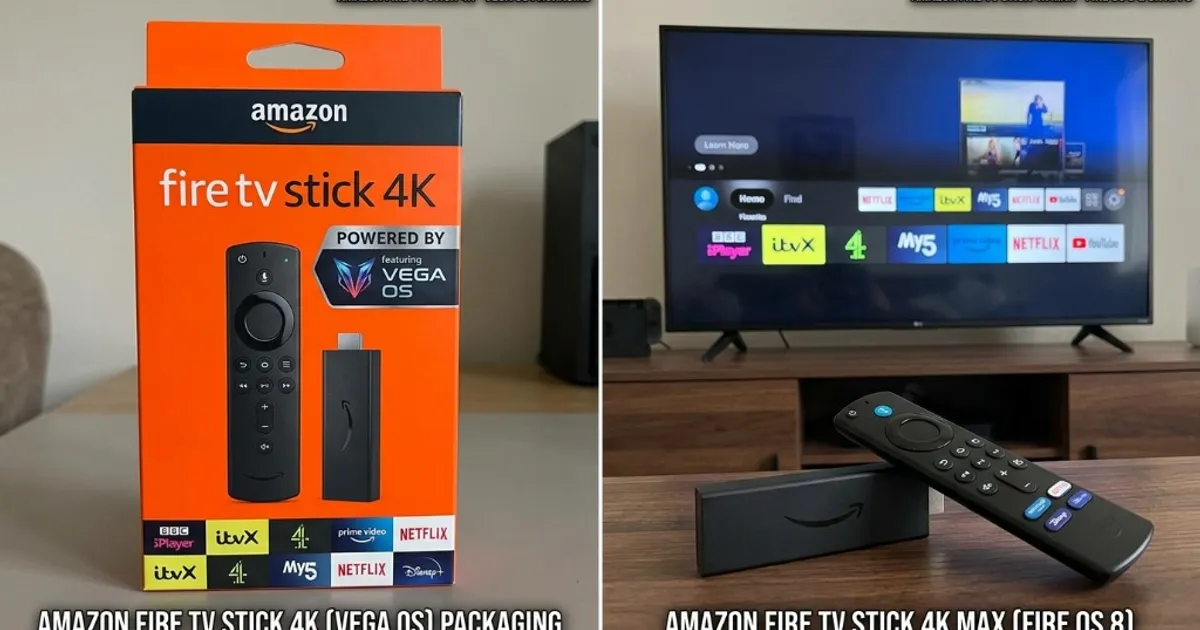
1. The October 2026 Firestick Shake-Up: What Is Amazon's Vega OS?
For a decade, the Amazon Fire TV Stick dominated UK streaming. Every generation ran Fire OS, Amazon's fork of Android AOSP. Because it retained the Android Runtime (ART), British cord-cutters could sideload media players like TiviMate and IPTV Smarters Pro via Downloader.
That changed in mid-October 2026. Following the end of Amazon's £32.99 UK introductory promo on 13 October 2026, retail units of the new Fire TV Stick 4K (3rd Gen) and Fire TV Stick HD arrived across the UK. Buyers quickly discovered Downloader was missing and asked: "Can you install Downloader on new Firestick 2026 models?"
The answer is no. These 2026 sticks run Vega OS (internally FOS Linux)—a proprietary Linux OS created by Lab126 with a React Native UI. Amazon made this switch for three reasons:
- Google Independence: Ending reliance on Android AOSP eliminates Google licensing constraints and upstream patch management.
- Efficiency: Stripping the Android runtime cut OS RAM overhead by ~40%, enabling faster cold boots on budget silicon.
- Ecosystem Control: Vega OS creates a closed, Apple-style garden where all apps must be vetted and monetized via Amazon's Appstore.
2. Why Downloader and TiviMate Cannot Run on Vega OS
The vega os vs fire os 8 firestick difference is architectural, not a hidden setting. Sideloading fails because the execution layers are incompatible.
The Binary Divide: .APK vs .VPKG
Android applications like TiviMate, IPTV Smarters Pro, and Downloader are compiled as Android packages (.apk), requiring the Android Runtime (ART) to execute bytecode.
Vega OS has no Android runtime. It cannot execute Android bytecode. Applications for Vega OS use Amazon's proprietary .vpkg format (compiled C++ or JavaScript/WebAssembly for React Native). Attempting to run an APK on Vega OS is impossible—the software stack simply does not exist.
Developer Mode Lockdown (13 October 2026 Notice)
Amazon's official Developer Documentation update on 13 October 2026 confirmed the technical reality:
- The consumer "Install Unknown Apps" toggle in the TV GUI is permanently removed.
- Development builds require an Amazon developer account, signed certificates, and a command-line SDK via USB or network bridge.
- Downloader cannot function on Vega OS because there is no package installer intent.
Therefore, if you are asking does tivimate work on new fire tv stick 4k models running Vega OS, the answer is an absolute no. TiviMate cannot be sideloaded onto Vega OS.
If you have compatible hardware, an enterprise service ensures seamless viewing. Explore our in-depth best IPTV provider for UK sports and channels to learn why dedicated CDN edge nodes and 50fps feeds prevent buffering.
3. The 20-Second Settings Check: Does Your Firestick Run Fire OS or Vega OS?
Because Amazon's hardware casing and remote controls look identical across generations, you cannot identify your OS from the outside. Follow this quick check to verify your software in under 20 seconds:
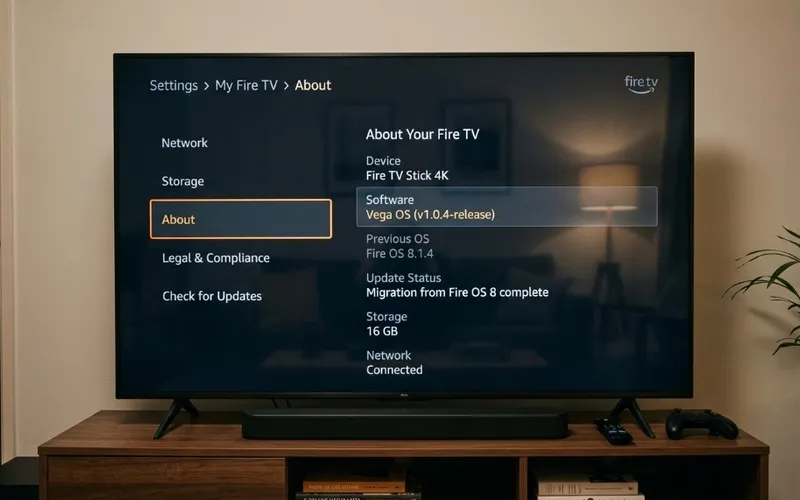
Open Fire TV Settings
From the Fire TV home screen, scroll right along the main navigation bar and select the Settings gear icon.
Select "My Fire TV"
Scroll down and click My Fire TV (labeled as Device & Software on certain models).
Click "About"
Select About at the top of the menu to view device specifications and system details.
Inspect the "Software Version"
Highlight Software Version on the right panel (as shown in Figure 2):
• Fire OS 7.x.x or Fire OS 8.x.x: Your stick is Android-based! You have full APK sideloading, Downloader, and TiviMate compatibility.
• Vega OS 1.x.x (or FOS Linux 1.0): Your stick runs Amazon's locked Linux OS. APK sideloading is permanently blocked.
If your device runs Fire OS 7 or 8, follow our complete master Firestick IPTV setup tutorial to enable Developer Options, install Downloader, and connect your live channels.
4. UK Fire TV Stick Lineup Breakdown: Fire TV Stick 4K Vega OS Apps UK Compatibility
UK retailers (Amazon UK, Argos, Currys, Very) currently stock a mix of older Android models and new Vega OS sticks. Knowing which firestick still runs android uk 2026 shoppers can safely buy is vital before making a purchase.
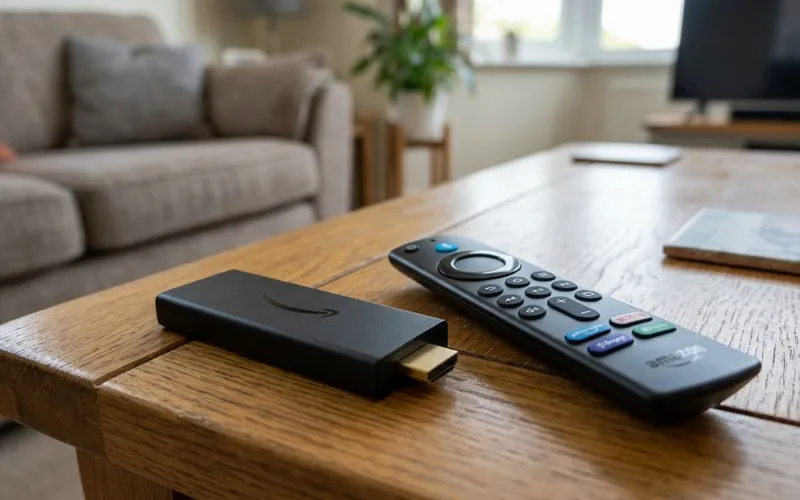
1. Fire TV Stick 4K Max (2nd Gen, 16GB) — TOP RECOMMENDATION
The Fire TV Stick 4K Max (2nd Gen) remains the flagship streaming stick in Amazon's UK lineup, and critically, it continues to run Fire OS 8 (Android 11). Amazon retained Android on the Max tier to preserve compatibility with advanced media players, smart home overlays, and gaming pipelines. With a 2.0 GHz quad-core processor, 2GB RAM, 16GB storage, Wi-Fi 6E, and AV1/HEVC hardware decoding, it is the best Amazon device for UK IPTV.
2. Fire TV Cube (3rd Gen) — UNRESTRICTED POWERHOUSE
Amazon's hands-free streaming box runs Fire OS 7/8. With an octa-core processor, HDMI input, built-in Ethernet, and full Android APK sideloading, it easily powers TiviMate's 4-screen sports Multi-View without frame drops.
3. Fire TV Stick 4K (3rd Gen, 2026) — DO NOT BUY FOR IPTV
Released in autumn 2026 in an orange box marked "All-New Fire TV Stick 4K", this model runs Vega OS. Sideloading is removed, Downloader is missing from the Appstore, and TiviMate cannot run. Avoid this model for IPTV.
4. Fire TV Stick HD (2026) — DO NOT BUY FOR IPTV
Replacing the Fire TV Stick Lite and standard Firestick, this entry-level 1080p dongle runs Vega OS with zero sideloading capabilities.
| Fire TV Model | Operating System | Android APK Support | Downloader Utility | TiviMate Support | UK IPTV Verdict |
|---|---|---|---|---|---|
| Fire TV Stick 4K Max (2nd Gen, 16GB) | Fire OS 8 (Android 11) | Full Native Support | Available in Appstore | 100% Compatible | Highly Recommended |
| Fire TV Cube (3rd Gen) | Fire OS 7 / 8 (Android) | Full Native Support | Available in Appstore | 100% Compatible | Premium Powerhouse |
| Fire TV Stick 4K (2nd Gen, 2023–2025 Stock) | Fire OS 8 (Android 11) | Full Native Support | Available in Appstore | 100% Compatible | Great Value (While Stock Lasts) |
| Fire TV Stick 4K (3rd Gen, 2026 Release) | Vega OS (FOS Linux) | Blocked (No ART) | Not Available | Incompatible | Do Not Buy for IPTV |
| Fire TV Stick HD (2026 Release) | Vega OS (FOS Linux) | Blocked (No ART) | Not Available | Incompatible | Do Not Buy for IPTV |
5. Best Alternative Streaming Hardware for UK IPTV in Late 2026
With Amazon walling off budget models, finding the best streaming stick for iptv uk 2026 buyers can trust outside Amazon is a top priority. These unrestricted alternatives offer open, future-proof streaming:
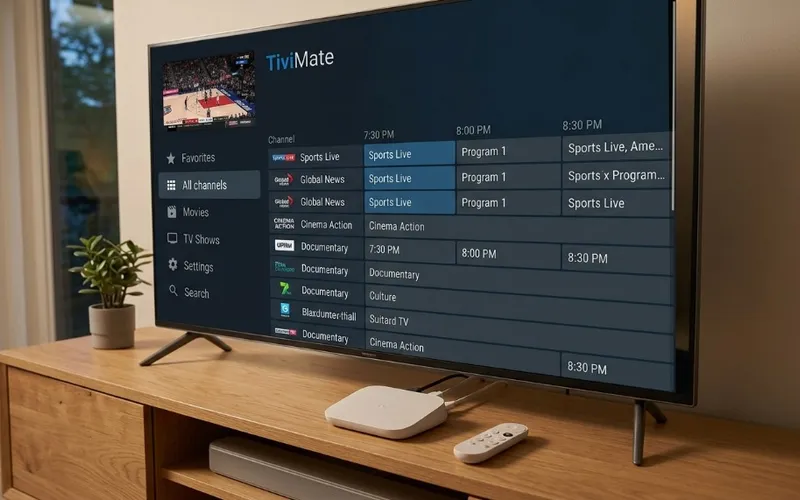
1. Google TV Streamer (4K) — THE NEW BENCHMARK
The Google TV Streamer (4K) features 32GB storage, 4GB RAM, and Gigabit Ethernet. Running Google TV (Android 14), you install TiviMate or IPTV Smarters Pro directly from the official Google Play Store with no sideloading required. Motion handling for 50fps UK sports (Sky Sports Main Event UHD, TNT Sports Ultimate) is reference-grade.
2. Chromecast with Google TV (4K) — BUDGET ANDROID CHAMPION
Existing retail stocks of the Chromecast with Google TV 4K (~£40–£55 at Argos and Currys) provide complete Android TV functionality with full Google Play access and Downloader compatibility.
3. Nvidia Shield TV Pro — THE ENTHUSIAST TITAN
With the Tegra X1+ chip, AI 4K upscaling, 3GB RAM, dual USB 3.0 ports for recording live matches to external SSDs, and Gigabit LAN, the Shield TV Pro remains the performance leader for UK IPTV power users.
4. Samsung (Tizen) & LG (webOS) Smart TVs — NO STICK NEEDED
Modern Samsung and LG TVs host approved native media players—specifically IBO Player and Smarters Player Lite—directly in their official app stores. For complete setup instructions, read our guide on how to install IPTV on Samsung Smart TV and LG webOS.
| Device Name | Operating System | App Freedom | Wi-Fi / Ethernet Spec | 4K Sports Motion | Price (UK Retail) |
|---|---|---|---|---|---|
| Amazon Fire TV Stick 4K Max (2nd Gen) | Fire OS 8 (Android) | Sideloading (Downloader) | Wi-Fi 6E (Tri-Band) | Fluid 50/60fps | £69.99 (Often £44.99 on sale) |
| Google TV Streamer (4K) | Google TV (Android 14) | 1-Click Google Play Store | Wi-Fi 5 + Gigabit Ethernet | Reference Quality | £99.00 |
| Chromecast with Google TV (4K) | Google TV (Android 12) | 1-Click Google Play Store | Wi-Fi 5 (802.11ac) | Fluid 50/60fps | £59.99 (Discounted to ~£40) |
| Nvidia Shield TV Pro | Android TV 11 | 1-Click Google Play + Sideload | Gigabit Ethernet + Wi-Fi 5 | AI-Upscaled Perfection | £189.99 |
| Apple TV 4K (3rd Gen) | tvOS 18 | Official App Store (UHF, IPTVX) | Wi-Fi 6 + Gigabit LAN (128GB) | Flawless 50/60fps | £149.00 – £169.00 |
6. Bought a Vega OS Stick by Mistake? Your Options and Workarounds
If you unboxed a new Fire TV Stick 4K (3rd Gen) or Fire TV Stick HD during the October Prime Big Deal Days and discovered Downloader is missing, you have three clear remedies:
🔄 Option 1: 30-Day UK Retail Return (Best Solution)
Under UK Consumer Rights legislation and standard retail return policies, you can return opened electronics within 30 days of purchase:
• Amazon UK: Go to Your Orders, choose Return or Replace, select "Performance or quality not adequate", and return via Evri or Post Office.
• Argos / Currys / Very: Return in-box with your receipt.
Once refunded, buy the Fire TV Stick 4K Max (2nd Gen) or a Google TV Streamer.
📺 Option 2: Use Native Smart TV Apps
If your return window closed, keep the Vega stick for Netflix and Prime Video, and use your Smart TV's native app store for IPTV:
• Samsung TVs: Install IBO Player from the Samsung Smart Hub.
• LG TVs: Download Smarters Player Lite from the LG Content Store.
Both connect directly via Xtream Codes API without needing an external Android stick.
Option 3: Screen Mirroring and Casting
As a temporary measure, run an IPTV app on an Android phone, tablet, or PC, and cast the stream to your Vega OS Firestick via Miracast or AirPlay. While acceptable for casual viewing, it is not ideal for 50fps live sports due to wireless latency.
Experiencing buffering during Premier League matches on any device? Explore our guide on how to eliminate IPTV buffering and ISP throttling to optimize your home router and DNS settings.
Test Your Streaming Hardware Risk-Free with VocoTV
Have a compatible Firestick, Google TV, or Smart TV? Experience unthrottled 50fps 4K live sports, 20,000+ global channels, and full UK Electronic Programme Guide integration with our 24-hour test line.
Claim Your 24-Hour Free Trial ⚡️7. Frequently Asked Questions (FAQ)
Here are concise, authoritative answers to the most common queries regarding Amazon's Vega OS rollout in the UK:
Can you install the Downloader app on the new 2026 Fire TV Stick 4K?
No. The 2026 3rd-generation Fire TV Stick 4K runs Amazon's new Linux-based Vega OS, which lacks the Android Runtime entirely. The Downloader app (developed by AFTVnews) is an Android application and cannot execute on Vega OS. Furthermore, Amazon has removed the consumer "Install Unknown Apps" developer menu on Vega hardware.
Does TiviMate work on Amazon Vega OS?
No. TiviMate is compiled strictly as an Android application (.apk). Because Vega OS does not support Android packages, TiviMate cannot be sideloaded, installed, or executed on Vega OS Firesticks. If you wish to use TiviMate, you must purchase a Fire TV Stick 4K Max (2nd Gen), Fire TV Cube, or Google TV Streamer.
Will Amazon force an update to convert older Firesticks (like the 4K Max) to Vega OS?
No. Amazon hardware engineers have confirmed that existing Fire OS 7 and Fire OS 8 devices—including the Fire TV Stick 4K Max (2nd Gen) and Fire TV Cube (3rd Gen)—will not be retroactively converted to Vega OS via over-the-air firmware updates. Converting an existing Android device to an entirely different Linux-based operating system with an incompatible app catalog would break millions of purchased customer apps. Older devices will continue receiving Fire OS security updates.
Which Fire TV Stick should I buy at Argos or Amazon UK for IPTV?
UK buyers looking for an Amazon streaming device for IPTV should buy only the Fire TV Stick 4K Max (2nd Gen, 16GB). Ensure the packaging explicitly mentions 16GB of storage and Wi-Fi 6E. Avoid the standard "All-New Fire TV Stick 4K" (orange box, 2026 release) and "Fire TV Stick HD", as both run Vega OS with zero sideloading capabilities.
Can I still use my VocoTV 24-hour free trial if I have a Vega OS Firestick?
Yes, but you cannot run the IPTV player directly on the Vega OS Firestick. Instead, you can use your VocoTV credentials on your Samsung or LG Smart TV using native store players (like IBO Player or Smarters Player Lite), on an Android phone or tablet, on an Apple device (via UHF or Smarters on tvOS/iOS), or on a Windows PC/Mac. Check our step-by-step setup guides for full instructions across all devices.
8. Conclusion: The Final UK Cord-Cutter's Verdict
Amazon's transition to Vega OS represents the most significant disruption to the UK streaming landscape in a decade. By stripping the Android runtime from its baseline 2026 Fire TV Stick 4K and Fire TV Stick HD models, Amazon has effectively transformed its entry-level hardware into a locked commercial appliance designed exclusively for vetted Appstore partners.
For British consumers and prospective IPTV subscribers, the purchasing directive is clear: steer completely clear of the standard 2026 Fire TV Stick 4K (3rd Gen) and Fire TV Stick HD. If you are committed to the Amazon ecosystem, purchase exclusively the Amazon Fire TV Stick 4K Max (2nd Gen, 16GB), which retains full Android Fire OS 8 sideloading capabilities. Alternatively, transition to the open Android TV ecosystem with the Google TV Streamer (4K), where TiviMate and Smarters install effortlessly from the Google Play Store with zero sideloading gymnastics. For comparisons between top players, explore our TiviMate Premium vs IPTV Smarters Pro benchmark.
Ready to experience flawless 50fps UK sports and uncompromised entertainment? Review our VocoTV flexible subscription packages, consult our comprehensive VocoTV device installation guide, or test your television right now with a 24-hour risk-free IPTV trial.
Related Topics & Keywords
About Liam O'Connor
Hardware & App Integration Lead at VocoTV
Passionate streaming hardware specialist with extensive testing experience benchmarking IPTV CDNs, Firestick decoder profiles, and UK sports broadcast distribution protocols.
Have questions about this guide or setting up your device? Chat directly with a UK streaming advisor on WhatsApp.